File Manager
Centralized storage for media files used in messages, chatbot knowledge, and templates.
File permissions are action-specific. Uploading, creating folders, renaming, moving, and deleting each require the corresponding access; read-only users can browse only what their role permits.
Where to Find It
Sidebar → GENERAL → File Manager — https://app.wabot.io/dashboard/file-manager
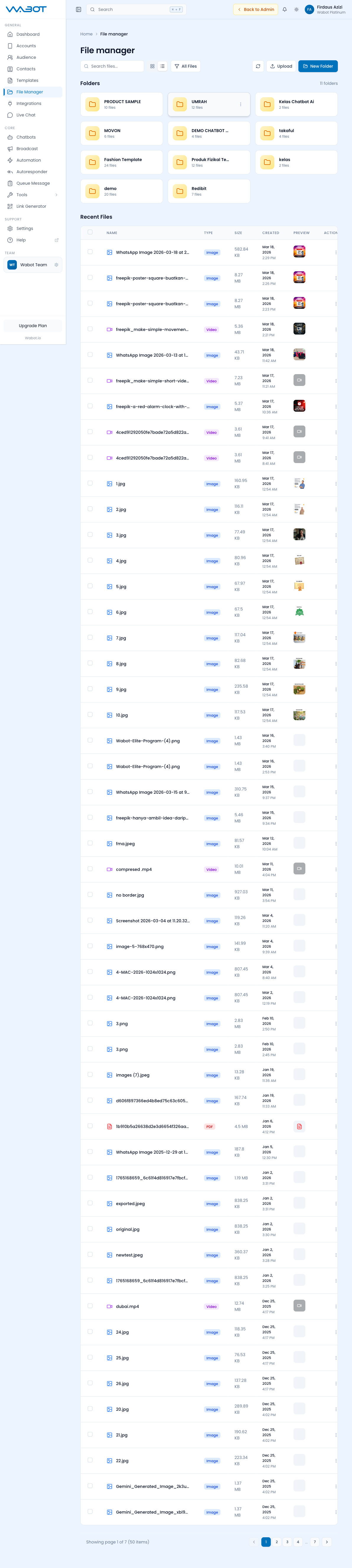
What You Can Store
- Images — JPEG, PNG, GIF (for message attachments, product photos)
- Videos — MP4, MOV (for promo videos, tutorials)
- Documents — PDF, DOCX, XLSX (invoices, catalogs, forms)
- Audio — MP3, OGG (voice notes, audio replies)
- AI Knowledge — files you've uploaded to train Chatbots
Storage Quotas
Your storage quota depends on your plan:
| Plan | Max File Upload | Total Storage |
|---|---|---|
| Lite | — | — |
| Basic | 2 MB | 100 MB |
| Plus | 10 MB | 300 MB |
| Premier | 15 MB | 500 MB |
| Platinum | 25 MB | 2 GB |
Check your current usage on the Dashboard → Storage card.
Managing Files
Upload and Organize Files
- Open GENERAL → File Manager.
- Open the target folder, or click New Folder and give it a clear name.
- Click Upload and select one or more files.
- Wait for each upload to finish before using it in a message.
- Use the Type filter or search to find files later.
- Open a file to preview it, copy its URL, download it, move it, or manage its details.
Use Files in Wabot
- Upload the file before opening the message editor.
- In a chatbot, broadcast, automation, template, or Live Chat conversation, choose the media or attachment control.
- Select the existing file or paste its file URL where the feature supports a URL.
- Preview the message and send a controlled test before using it in a campaign.
Keep Storage Healthy
- Review the storage usage card on the Dashboard.
- Keep campaign assets in named folders, for example
Campaigns/Raya-2026orProducts/Skincare. - Delete duplicate, expired, or unused files after confirming that no active automation, chatbot, template, or broadcast depends on them.
- Retain the original source file outside Wabot when it is business-critical.
Best Practices
- Compress images before uploading (use tinypng.com or similar)
- Keep video lengths short (under 2 minutes for marketing clips)
- Delete old broadcast attachments you no longer need
- Organize files into folders by campaign or product category